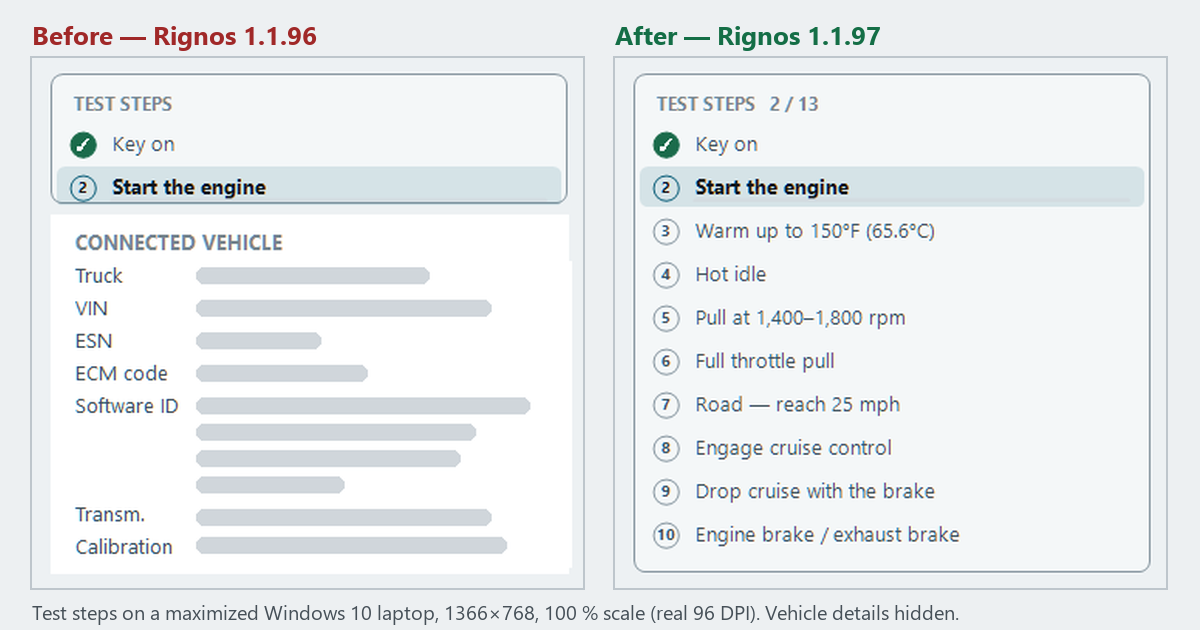
Rignos 1.1.97 is available for both Advanced and Technician. It fixes how the app lays out on Windows laptops running at 100 % display scale, such as the common 1366×768 workshop laptop.
What changed
- The Test step list always shows the running step. It now shows whole rows only. When the window is too short for every step, it shows the running step with the steps around it, and the title shows where you are, for example TEST STEPS 2 / 13. Before, a maximized 1366×768 window on Windows 10 showed only one and a half of the 13 road-test steps.
- Pages open at the top. Vehicle info, Report, fault-code detail and Freeze frame open at the top of the page. Before, Vehicle info could reopen scrolled down after the window was resized, showing only its last row.
How it was tested
The release was tested with the laptop display actually set to 1366×768 at 100 % scale (96 DPI), in maximized, half-screen and small windows, in the light and dark themes. Flash and ECU programming are unchanged from 1.1.96.
How to update
Click Check updates in Rignos, or download the installer from the download page.